


Exterior Lamp Controls
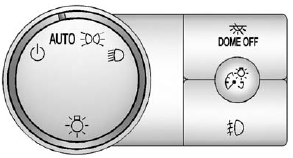
Exterior Lamp Controls
The exterior lamps control is located on the instrument panel to the left of the steering wheel.
It controls the following systems:
• Headlamps
• Taillamps
• Parking Lamps
• License Plate Lamps
• Instrument Panel Lights
• Roof Marker Lamps (If Equipped)
The exterior lamps control has four positions:
 (Off): Turns off the automatic headlamps and Daytime Running Lamps (DRL). Turn the headlamp control to the off position again to turn the automatic headlamps or DRL back on.
For vehicles first sold in Canada, the off position will only work when the vehicle is shifted into P (Park).
AUTO (Automatic): Automatically turns on the headlamps at normal brightness, together with the following:
• Parking Lamps
• Instrument Panel Lights
• Taillamps
• License Plate Lamps
• Roof Marker Lamps (If Equipped)
When the vehicle is turned off and the headlamps are in AUTO, the headlamps may automatically remain on for a set time. The time of the delay can be changed using the DIC. See Driver Information Center (DIC) on page 5‑33  (Parking Lamps): Turns on the parking lamps together with the following:
• Instrument Panel Lights
• Taillamps
• License Plate Lamps
• Roof Marker Lamps (If Equipped)
 (Headlamps): Turns on the headlamps together with the following:
• Parking Lamps
• Instrument Panel Lights
• Taillamps
• License Plate Lamps
• Roof Marker Lamps (If Equipped)
When the headlamps are turned on while the vehicle is on, the headlamps turn off automatically 10 minutes after the ignition is turned off. When the headlamps are turned on while the vehicle is off, the headlamps will stay on for 10 minutes before automatically turning off to prevent the battery from being drained. Turn the headlamp control to off and then back to the headlamp on position to make the headlamps stay on for an additional 10 minutes.
Push the turn signal/multifunction lever toward the instrument panel to change the headlamps from low beam to high beam.
See also:
Checking Coolant
The vehicle must be on a level surface when checking the coolant level.
Check to see if coolant is visible in the coolant surge tank. If the coolant
inside the coolant surge tank is boiling, do not ...
Cooling System
2.4L L4 Engine
A. Engine Cooling Fan (Out of View)
B. Engine Coolant Surge Tank and Pressure Cap
3.0L V6 Engine
A. Engine Cooling Fans (Out of View)
B. Engine Coolant Surge Tank and Pressure ...
Security
OnStar provides services like Stolen Vehicle Assistance, Remote Ignition Block,
and Roadside Assistance, if the vehicle is equipped with these services. OnStar
can unlock the vehicle doors remotel ...