


Instrument Panel Storage
For vehicles equipped with an instrument panel storage area, it is located above the glove box.
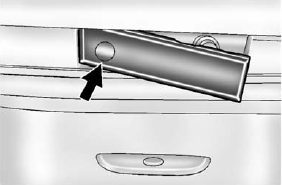
Access the storage area by pressing and holding in the driver side of the handle and pull out on the exposed portion of the handle.
See also:
Making Turns
Notice: Making very sharp turns while trailering could cause the trailer to come in contact with the vehicle. The vehicle could be damaged. Avoid making very sharp turns while trailering.
When turnin ...
Power Steering Fluid (3.0L V6 Engine)
The power steering fluid reservoir is located toward the rear of the engine compartment
on the passenger side of the vehicle. See Engine Compartment Overview on page 10‑6
for reservoir loc ...
Immobilizer Operation
This vehicle has a passive theft-deterrent system.
The system does not have to be manually armed or disarmed. The vehicle is automatically
immobilized when the key is removed from the ignition.
Th ...