


Dome Lamp Override
The dome lamp override button is located next to the exterior lamps control.
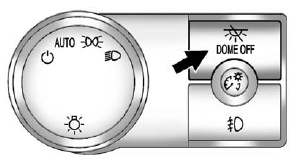
 : Press the button in and the dome lamps remain off when a door is opened. Press the button again to return it to the extended position so that the dome lamps come on when a door is opened.
See also:
Reporting Safety Defects to the United States Government
If you believe that your vehicle has a defect which could cause a crash or could cause injury or death, you should immediately inform the National Highway Traffic Safety Administration (NHTSA) in addi ...
License Plate Lamp
To replace one of these bulbs:
1. Reach under the rear bumper for the bulb socket.
2. Turn the bulb socket counterclockwise and pull the bulb socket out of the lamp assembly.
3. Pull the old bulb ...
Trailer Brake Control Panel
A. Manual Trailer Brake Apply Lever
B. Trailer Gain Adjustment Buttons
The ITBC system has a control panel located on the instrument panel to the left of the steering column. See Instrument Panel ...