


Heated and Ventilated Seats
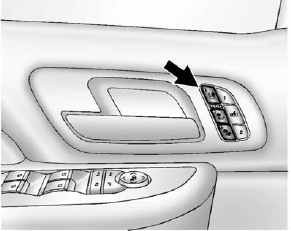
Heated and Cooled Seat Buttons Shown, Heated Seat Buttons Similar
If available, the buttons are on the front doors.
 : If available, press to cool the seat.
 : Press to heat the seatback only.
 : Press to heat the seat and seatback.
Press the button once for the highest setting. With each press of the button, the seat will change to the next lower setting, and then to the off setting. The lights indicate three for the highest setting and one for the lowest.
See Heated and Ventilated Front Seats on page 3‑9.
See also:
Head Restraint Adjustment
Do not drive until the head restraints for all occupants are installed and adjusted properly.
To achieve a comfortable seating position, change the seatback recline angle as little as necessary while ...
Flash-to-Pass
This feature is used to signal to the vehicle ahead that you want to pass.
If the headlamps are off or in the low-beam position, pull the turn signal lever toward you to momentarily switch to high be ...
Floor Mats
WARNING
If a floor mat is the wrong size or is not properly installed, it can interfere with the pedals.
Interference with the pedals can cause unintended acceleration and/or increased stopping dist ...