


Turn and Lane-Change Signals
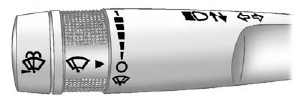
An arrow on the instrument panel cluster flashes in the direction of the turn or lane change.
Move the lever all the way up or down to signal a turn.
Raise or lower the lever until the arrow starts to flash to signal a lane change. Hold it there until the lane change is completed. If the lever is briefly pressed and released, the turn signal flashes three times.
The lever returns to its starting position whenever it is released.
If after signaling a turn or lane change the arrow flashes rapidly or does not come on, a signal bulb might be burned out.
Have the bulbs replaced. If the bulb is not burned out, check the fuse.
See Fuses and Circuit Breakers on page 10‑31.
Turn Signal On Chime
If either one of the turn signals is left on and the vehicle has been driven more than 1.2 km (0.75 mi), a chime will sound.
See also:
Automatic Transmission Shift Lock Control Function Check
WARNING
When you are doing this inspection, the vehicle could move suddenly. If the vehicle
moves, you or others could be injured.
1. Before starting this check, be sure there is enough room aroun ...
Passing
More passing distance is needed when towing a trailer. Because the rig is longer,
it is necessary to go farther beyond the passed vehicle before returning to the
lane. ...
Head Restraint Adjustment
Do not drive until the head restraints for all occupants are installed and adjusted properly.
To achieve a comfortable seating position, change the seatback recline angle as little as necessary while ...