


Floor Console Storage
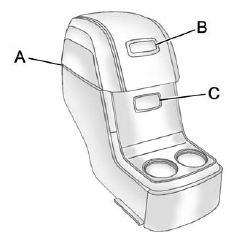
For vehicles with a second row center console, open each area to access the storage compartment inside.
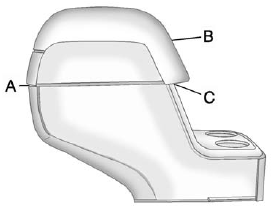
To access the upper storage area, press the upper button (B) and lift up. To access the lower storage area, press the lower button (C) and lift up. The top of the console can be folded forward for increased storage area. Lift up on the handle on the rear of the console (A) and pull forward.
WARNING
Never open more than one of the three latches at a time to help avoid personal injury and damage to the console.
Notice: Slide the front console as far forward as it will go before folding the second row console forward to help prevent damage to the consoles.
See also:
Using Universal Remote
Press and hold the appropriate Universal Remote button for at least half of a second. The indicator light will come on while the signal is being transmitted. ...
Starting the Engine
If the vehicle has a diesel engine, see the Duramax diesel supplement for more information.
If the vehicle is a hybrid, see the hybrid supplement for more information.
Notice: Do not try to shift to ...
When to Check
Check the tires once a month or more.
Do not forget the spare tire, if the vehicle has one.
SeeFull-Size Spare Tire on page 10‑91 for additional information. ...