


Lumbar Adjustment
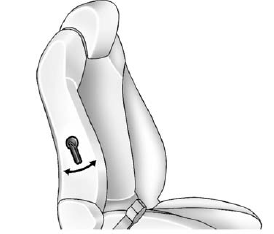
Manual Lumbar
If available, move the handle forward or rearward to increase or decrease lumbar support.
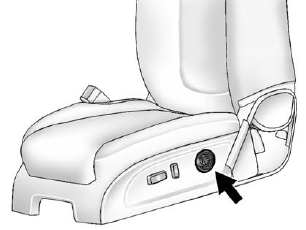
Power Lumbar
If available, press and hold the front or rear of control to increase or decrease lumbar support. Release the control when the seatback reaches the desired level of lumbar support.
See also:
Folding the Seatback
To fold the second row seatbacks:
1. Remove anything on or under the seat.
2. Place the armrest in the upright position, and unfasten the safety belt.
3. Pull forward on the reclining seatback stra ...
Off-Road Recovery
The vehicle's right wheels can drop off the edge of a road onto the shoulder while driving. Follow these tips:
1. Ease off the accelerator and then, if there is nothing in the way, steer the vehicl ...
Using the Auxiliary Input Jack
Radios with an auxiliary input jack located on the lower right side of the faceplate can connect to an external audio device such as an iPod®, MP3 player, or CD player, for use as another source for ...