


Roof
Sunroof
The ignition must be in ON/RUN or ACC/ACCESSORY to operate the sunroof and power sunshade.
See Retained Accessory Power (RAP) on page 9‑20.
The vehicle may have a sunroof over the front seats and a rear sunroof over the second row seats.
The rear sunroof does not open.
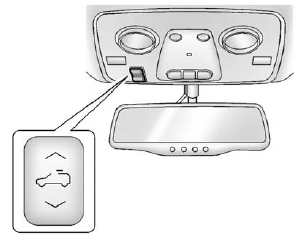
The switch to operate the front sunroof is on the headliner above the rearview mirror.
Vent: From the closed position, press and hold the front of the switch to vent the sunroof. Press and hold the rear of the switch to close the sunroof.
Express-open/Express-close:
From the closed position, press and release the rear of the switch to express-open the sunroof. Press and release the front of the switch to express-close the sunroof.
Manual Sunshade
The front sunshade must be opened and closed manually. To open the sunshade, press the button on the sunshade handle to release it and guide it back. To close the sunshade, pull the sunshade forward until it latches.
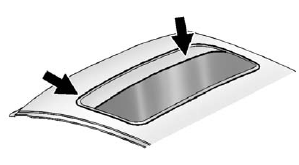
Dirt and debris may collect on the sunroof seal or in the track.
This could cause an issue with sunroof operation or noise.
It could also plug the water drainage system. Periodically open the sunroof and remove any obstacles or loose debris. Wipe the sunroof seal and roof sealing area using a clean cloth, mild soap, and water.
Do not remove grease from the sunroof.
See also:
Park Brake and P (Park) Mechanism Check
WARNING
When you are doing this check, the vehicle could begin to move.
You or others could be injured and property could be damaged.
Make sure there is room in front of the vehicle in case it begi ...
Reading Lamps
For vehicles with reading lamps in the overhead console, press the button located next to the lamp to turn it on or off.
The vehicle may also have reading lamps in other locations. To turn the lamps ...
Place a Call Using a Stored Number
1. Push . System responds:
“OnStar ready.” 2. Say “Call <name tag>.” System responds: “OK, calling <name tag>.” ...