


Steering Wheel Controls
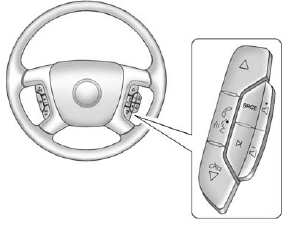
Steering Wheel Controls
 or
or
 : Press to change favorite radio stations, select tracks on a CD/DVD, or navigate tracks or folders on an iPod® or USB device.
 : Press to silence the vehicle speakers only. Press again to turn the sound on. Press and hold longer than two seconds to interact with OnStar® or Bluetooth systems.
 and
and
 : Increase or decrease volume.
: Press to reject an incoming call, or to end a call.
SRCE: Press to switch between the radio, CD, and for equipped vehicles, DVD, front auxiliary, and rear auxiliary.
 : Press to seek the next radio station, track, or chapter while sourced to the CD or DVD slot, or to select tracks and folders on an iPod® or USB device.
For more information, see Steering Wheel Controls on page 5‑2.
See also:
Lane Departure Warning (LDW)
For vehicles with this feature, read the entire section before using it.
WARNING
The LDW system does not steer the vehicle and is an aid to help the vehicle stay
in the driving lane. The LDW syste ...
Hood
To open the hood:
1. Pull the release handle located below the instrument panel to the left of
the steering wheel.
2. Move the secondary hood release lever to the right to release the striker. ...
XM™ Satellite Radio Service
XM Satellite Radio Service gives digital radio reception from coast to coast
in the 48 contiguous United States, and in Canada. Just as with FM, tall buildings
or hills can interfere with satellit ...