


Instrument Panel
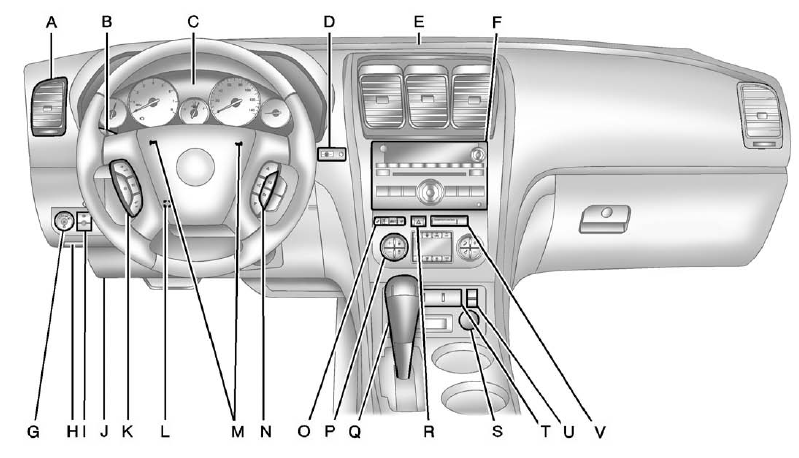
Instrument Panel
A. Air Vents on page 8‑12.
B. Windshield Wiper/Washer on page 5‑5.
C. Instrument Cluster on page 5‑12.
D. Head-Up Display (HUD) on page 5‑33 (If Equipped).
E. Instrument Panel Storage on page 4‑1. USB Port (Inside IP Storage). Auxiliary
Devices on page 7‑36.
F. Infotainment on page 7‑1. Navigation/Radio System (If Equipped). See the
separate navigation manual.
G. Exterior Lamp Controls on page 6‑1.
H. Hood Release. See Hood on page 10‑4.
I. Instrument Panel Illumination Control on page 6‑5.
J. Data Link Connector (DLC) (Out of View). See Malfunction Indicator Lamp on
page 5‑18.
K. Cruise Control on page 9‑32.
L. Steering Wheel Adjustment on page 5‑2.
M. Horn on page 5‑5.
N. Steering Wheel Controls on page 5‑2.
O. Driver Information Center (DIC) Buttons (If Equipped). See Driver Information
Center (DIC) (Without DIC Buttons) on page 5‑30 or Driver Information Center
(DIC) (With DIC Buttons) on page 5‑25.
P. Dual Automatic Climate Control System on page 8‑4.
Q. Console Shift Lever (If Equipped). See “Console Shift Lever” under Shifting
Into Park on page 9‑20.
R. Hazard Warning Flashers on page 6‑4.
S. Power Outlets on page 5‑9.
T. Rear Window Wiper/Washer on page 5‑6.
Traction Control System (TCS) Disable Button. See StabiliTrak® System on page
9‑30.
Tow/Haul Button (If Equipped). See Tow/Haul Mode on page 9‑26.
Power Liftgate Button (If Equipped). See Liftgate on page 2‑10.
U. Heated and Ventilated Front Seats on page 3‑9 (If Equipped).
V. Passenger Airbag Status Indicator on page 5‑17 (If Equipped).
See also:
Tire Pressure Light
For vehicles with the Tire Pressure Monitor System (TPMS), this light comes on briefly when the engine is started. It provides information about tire pressures and the TPMS. ...
Easy Exit Driver Seat
This feature can move the seat rearward to allow extra room to exit the vehicle.
(Easy Exit Driver Seat): Press to recall the easy exit seat position.
The vehicle must be in P (Park).
If the easy ...
Using Cruise Control on Hills
How well the cruise control works on hills depends on the vehicle speed, the load, and the steepness of the hills. When going up steep hills, pressing the accelerator pedal may be necessary to maintai ...