


Selecting the Alert Timing
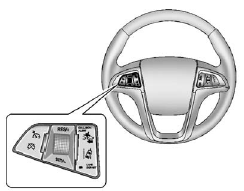
The Collision Alert control is on the steering wheel. Press COLLISION ALERT to set the alert timing to far, medium, near or off. The first button press shows the current control setting on the DIC. Additional button presses will change this setting. The chosen setting will remain until it is changed and will affect both the Collision Alert and the Tailgating Alert features. The timing of both alerts will vary based on vehicle speed. The faster the vehicle speed, the further away the alert will occur. Consider traffic and weather conditions when selecting the alert timing. The range of selectable alert timing may not be appropriate for all drivers and driving conditions.
See also:
Driving on Snow or Ice
Drive carefully when there is snow or ice between the tires and the road, creating less traction or grip.
Wet ice can occur at about 0°C (32°F) when freezing rain begins to fall, resulting in even ...
Safety Belt Use During Pregnancy
Safety belts work for everyone, including pregnant women. Like all occupants,
they are more likely to be seriously injured if they do not wear safety belts.
A pregnant woman should wear a lap-sho ...
Privacy
The complete OnStar Privacy Statement may be found at www.onstar.com. Privacy-sensitive
users of wireless communications are cautioned that the privacy of any information
sent via wireless cellula ...