


Parking Brake
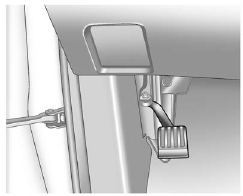
To set the parking brake, hold the regular brake pedal down, then push the parking brake pedal down.
If the ignition is on, the brake system warning light will come on. See Brake System Warning Light on page 5‑16.
Notice: Driving with the parking brake on can overheat the brake system and cause premature wear or damage to brake system parts. Make sure that the parking brake is fully released and the brake warning light is off before driving.
To release the parking brake, hold the regular brake pedal down, then push down momentarily on the parking brake pedal until you feel the pedal release. Slowly pull your foot up off the park brake pedal. If the parking brake is not released when you begin to drive, the brake system warning light will be on and a chime will sound warning you that the parking brake is still on.
If you are towing a trailer and are parking on a hill, see Driving Characteristics and Towing Tips on page 9‑57.
See also:
Turn and Lane-Change Signals
An arrow on the instrument panel cluster will flash in the direction of the turn
or lane change.
Move the lever all the way up or down to signal a turn.
Raise or lower the lever until the arrow ...
Battery Replacement
To change the batteries on the headphones:
1. Turn the screw to loosen the battery door located on the left side of the headphones. Slide the battery door open.
2. Replace the two batteries in the c ...
Temperature – A, B, C
The temperature grades are A (the highest), B, and C, representing the tire's resistance to the generation of heat and its ability to dissipate heat when tested under controlled conditions on a specif ...