


Climate Control Systems
The vehicle's heating, cooling, defrosting, and ventilation can be controlled with this system.
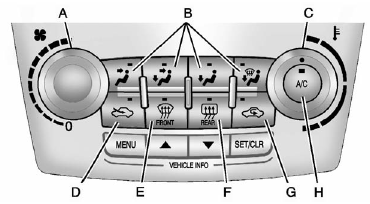
A. Fan Control
B. Air Delivery Mode Controls
C. Temperature Control
D. Outside Air
E. Front Defrost
F. Rear Window Defogger
G. Recirculation
H. Air Conditioning
 (Fan Control): Turn to increase
or decrease the fan speed. Turn the knob completely to T to turn the fan off.
(Fan Control): Turn to increase
or decrease the fan speed. Turn the knob completely to T to turn the fan off.
Temperature Control: Turn to increase or decrease the temperature.
Air Delivery Mode Control: To change the current mode, select one of the following:
 (Vent): Air is directed to the instrument
panel outlets.
(Vent): Air is directed to the instrument
panel outlets.
 (Bi-Level): Air is directed to the
instrument panel outlets and the floor outlets.
(Bi-Level): Air is directed to the
instrument panel outlets and the floor outlets.
 (Floor): Air is directed to the
floor outlets.
(Floor): Air is directed to the
floor outlets.
 (Defog): Clears the windows of fog
or moisture. Air is directed to the windshield and floor outlets.
(Defog): Clears the windows of fog
or moisture. Air is directed to the windshield and floor outlets.
 FRONT (Front Defrost): Clears the
windshield of fog or frost more quickly. Air is directed to the windshield and side
window outlets.
FRONT (Front Defrost): Clears the
windshield of fog or frost more quickly. Air is directed to the windshield and side
window outlets.
For best results, clear all snow and ice from the windshield before defrosting.
Do not drive the vehicle until all the windows are clear.
See also:
How to Wear Safety Belts Properly
This section is only for people of adult size.
There are special things to know about safety belts and children. And there are different rules for smaller children and infants. If a child will be rid ...
Torque Lock
Torque lock is when the weight of the vehicle puts too much force on the parking pawl in the transmission. This happens when parking on a hill and shifting the transmission into P (Park) is not done p ...
Tire Sidewall Labeling
Useful information about a tire is molded into the sidewall. The examples show a typical passenger and light truck tire sidewall.
Passenger (P-Metric) Tire
(A) Tire Size: The tire size code is a c ...