


Video Screens
The video screens are located in the back of the driver and front passenger seats.
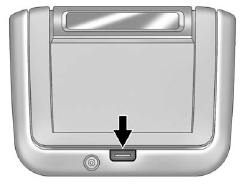
To use the video screen:
1. Push the release button located on the seatback console.
2. Move the screen to the desired viewing position.
Push the video screen down into its locked position when it is not in use. The screen turns off automatically.
Only the left RSE seatback console contains the infrared transmitters for the wireless headphones. They may be visible as eight illuminated LEDs. These LEDs are not on the right video screen. Both seatback consoles contain an infrared receiver for the remote control. They are located at the top of each console.
Notice: Avoid directly touching the video screen, as damage may occur. See “Cleaning the Video Screens” later in this section for more information.
See also:
Emergency
With Automatic Crash Response, the built-in system can automatically connect to help in a crash even if you cannot ask for it.
Push to connect to an Emergency Advisor. GPS technology is used to iden ...
Theft-Deterrent Feature
TheftLock® is designed to discourage theft of the vehicle's radio by learning a portion of the Vehicle Identification Number (VIN).
The radio does not operate if it is stolen or moved to a different ...
If Steam Is Coming from the Engine Compartment
WARNING
Steam from an overheated engine can burn you badly, even if you just open the hood. Stay away from the engine if you see or hear steam coming from it. Turn it off and get everyone away from t ...