


Auxiliary Devices
For vehicles equipped with the MyLink or IntelliLink infotainment system, see the separate MyLink/ IntelliLink Features and Functions Guide for more information.
This vehicle has an auxiliary input jack in the center console. Possible auxiliary audio sources include:
○ Laptop computer
○ MP3 player
○ Tape player
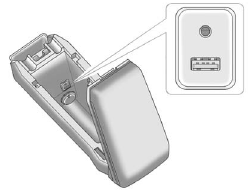
The auxiliary input is located in the center console.
This jack is not an audio output. Do not plug headphones into the auxiliary input jack. Drivers are encouraged to set up any auxiliary device while the vehicle is in P (Park).
Connect a 3.5 mm (1/8 in) cable from the auxiliary device to the auxiliary input jack. When a device is connected, the system automatically begins playing audio from the device over the vehicle speakers.
If an auxiliary device has already been connected, but a different source is currently active, press the Now Playing screen button on the Home Page, then press Source repeatedly to cycle through all of the available audio source screens, until the AUX source screen is selected.
Playback of an audio device connected to the 3.5mm auxiliary input jack can only be controlled using the controls on the device.
See also:
Heated and Ventilated Seats
Heated and Cooled Seat Buttons Shown, Heated Seat Buttons Similar
If available, the buttons are on the front doors.
: If available, press to cool the seat.
: Press to heat the seatback only ...
Loading the Vehicle for Off-Road Driving
WARNING
• Unsecured cargo on the load floor can be tossed about when driving over rough terrain. You or your passengers can be struck by flying objects. Secure the cargo properly.
• Keep cargo i ...
Heated Front Seats
WARNING
If you cannot feel temperature change or pain to the skin, the seat heater may
cause burns even at low temperatures. To reduce the risk of burns, people with such
a condition should use c ...