


Turn and Lane-Change Signals
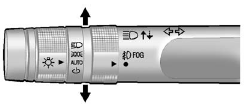
An arrow on the instrument panel cluster will flash in the direction of the turn or lane change.
Move the lever all the way up or down to signal a turn.
Raise or lower the lever until the arrow starts to flash to signal a lane change. Hold it there until the lane change is complete. If the lever is briefly pressed and released, the turn signal flashes three times.
The lever returns to its starting position when it is released.
If after signaling a turn or a lane change the arrows flash rapidly or do not come on, a signal bulb may be burned out.
Have the bulbs replaced. If the bulb is not burned out, check the fuse; see Fuses on page 10‑38 for more information.
See also:
Portable Audio Devices
This vehicle may have an auxiliary input located on the radio faceplate and a USB port located in the center console or on the instrument panel.
External devices such as an iPod®, laptop computer, ...
DVD Display Error Messages
The DVD display error message depends on which radio the vehicle has. The video screen might display one of the following:
Disc Load/Eject Error: This message displays when there are disc load or eje ...
Tire Inspection
We recommend that the tires, including the spare tire, if the vehicle has one, be inspected for signs of wear or damage at least once a month.
Replace the tire if:
• The indicators at three or mor ...