


Steering Wheel Controls
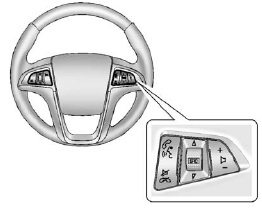
For vehicles with audio steering wheel controls, some audio controls can be adjusted at the steering wheel.
 (Push to Talk): For vehicles with
Bluetooth® or OnStar®, press to interact with those systems. See Bluetooth (Overview)
on page 7‑34 or Bluetooth (Infotainment Controls) on page 7‑36 or Bluetooth (Voice
Recognition) on page 7‑39 or OnStar Overview on page 14‑1 for more information.
(Push to Talk): For vehicles with
Bluetooth® or OnStar®, press to interact with those systems. See Bluetooth (Overview)
on page 7‑34 or Bluetooth (Infotainment Controls) on page 7‑36 or Bluetooth (Voice
Recognition) on page 7‑39 or OnStar Overview on page 14‑1 for more information.
 (Mute/End Call): Press to reject
an incoming call, or end a current call. Press to silence the vehicle speakers while
using the infotainment system. Press again to turn the sound on.
(Mute/End Call): Press to reject
an incoming call, or end a current call. Press to silence the vehicle speakers while
using the infotainment system. Press again to turn the sound on.
 (Toggle Switch): Press to select
an audio source.
(Toggle Switch): Press to select
an audio source.
Toggle up or down to select the next or previous favorite radio station or CD/MP3 track.
 (Volume): Press + or − to increase
or decrease the volume.
(Volume): Press + or − to increase
or decrease the volume.
See also:
Starting the Vehicle
1. Aim the RKE transmitter at the vehicle.
2. Press and release
.
3. Immediately after completing Step 2, press and hold
until the turn signal lamps flash.
When the vehicle starts, the parking ...
Fixed Mast Antenna
The fixed mast antenna can withstand most car washes without being damaged as long as it is securely attached to the base. If the mast becomes slightly bent, straighten it out by hand. If the mast is ...
Vehicle Security
This vehicle has theft-deterrent features; however, they do not make it impossible
to steal. ...