


Memory Seats
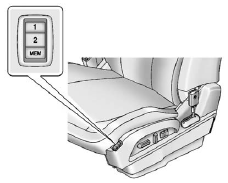
On vehicles with the memory feature, the “1” and “2” buttons on the outboard side of the driver seat are used to manually save and recall the driver seat and outside mirror positions. These manually stored positions are referred to as Button Memory positions.
The vehicle will also automatically save driver seat and outside mirror positions to the current driver Remote Keyless Entry (RKE) transmitter when the ignition is turned off. These automatically stored positions are referred to as RKE Memory positions. See Remote Keyless Entry (RKE) System Operation on page 2‑3 for more information.
Storing Button Memory Positions To save positions into Button Memory:
1. Adjust the driver seat, seatback recliner, and both outside mirrors to the desired driving positions.
2. Press and hold MEM (Memory) and “1” at the same time until a beep sounds.
3. Repeat Steps 1 and 2 for a second driver using “2.”
Recalling Button Memory Positions
To recall the manually saved Button Memory positions, press and hold “1” or “2.” The driver seat and outside mirrors move to the positions stored to those buttons when pressed. Releasing “1” or “2” before the stored positions are reached stops the recall.
If something has blocked the driver seat while recalling a memory position, the recall may stop. Remove the obstruction; then press and hold the appropriate manual control for the memory item that is not recalling for two seconds. Try recalling the memory position again by pressing the appropriate memory button. If the memory position is still not recalling, see your dealer for service.
Recalling RKE Memory Positions (Memory Remote Recall)
The Memory Remote Recall feature can recall the driver seat and outside mirrors to previously stored RKE Memory positions when entering the vehicle.
Every time the ignition is turned off, the positions of the driver seat and outside
mirrors are automatically stored to the RKE transmitter that was used to start the
vehicle. These positions are called RKE Memory positions and may be different than
the previously mentioned Button Memory positions saved to the “1” or “2” buttons.
To automatically recall RKE Memory positions, unlock the driver door with the RKE
transmitter and open the driver door. If the driver door is already open, pressing
the RKE transmitter  button will also
activate the RKE Memory recall. The driver seat and outside mirrors will move to
the previously saved RKE Memory positions.
button will also
activate the RKE Memory recall. The driver seat and outside mirrors will move to
the previously saved RKE Memory positions.
This feature is turned on or off using the vehicle personalization menu. See Vehicle Personalization on page 5‑33 for more information.
To stop recall movement, press any of the memory, power mirror, or power seat controls.
If something has blocked the driver seat while recalling a memory position, the
recall may stop. Remove the obstruction; then press and hold the appropriate manual
control for the memory item that is not recalling for two seconds. Try recalling
the memory position again by opening the driver door and pressing the RKE
 button. If the memory position is still
not recalling, see your dealer for service.
button. If the memory position is still
not recalling, see your dealer for service.
See also:
Parking on Hills
WARNING
Parking the vehicle on a hill with the trailer attached can be dangerous. If
something goes wrong, the rig could start to move. People can be injured, and both
the vehicle and the trailer ...
Power Seats
Power Seats
A. Seat Adjustment Control
B. Seatback Control
C. Lumbar Control
To adjust a power seat, if equipped:
• Move the seat forward or rearward by sliding the control (A) forward or r ...
Cellular and GPS Antennas
Avoid placing items over or near the antenna to prevent blocking cellular and GPS signal reception. Cellular reception is required for OnStar to send remote signals to the vehicle. ...