


OnStar Overview
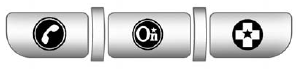
If equipped, this vehicle has a comprehensive, in-vehicle system that can connect to a live Advisor for Emergency, Security, Navigation, Connection, and Diagnostic Services.
The OnStar system status light is next to the OnStar buttons. If the status light is:
• Solid Green: System is ready.
• Flashing Green: On a call.
• Red: Indicates a problem.
Push  or call 1-888-4-ONSTAR (1-888-466-7827) to speak to an Advisor.
Push  to:
to:
• Make a call, end a call, or answer an incoming call.
• Give OnStar Hands-Free Calling voice commands.
• Give OnStar Turn-by-Turn Navigation voice commands.
Requires the available Directions and Connections service plan.
Push to connect to a live Advisor to:
• Verify account information or update contact information.
• Get driving directions. Requires the available Directions and Connections service plan.
• Receive On-Demand Diagnostics for a check on the vehicle’s key operating systems.
• Receive Roadside Assistance.
Push  to get a priority
connection to an Emergency Advisor available 24/7 to:
to get a priority
connection to an Emergency Advisor available 24/7 to:
• Get help for an emergency.
• Be a Good Samaritan or respond to an AMBER Alert.
• Get crisis assistance and evacuation routes.
See also:
Tire Rotation
Tires should be rotated every 12 000 km (7,500 mi). See Maintenance Schedule on page 11‑3.
Tires are rotated to achieve a uniform wear for all tires. The first rotation is the most important.
...
Disconnecting the RVC
The rear vision camera must be disconnected if the tailgate needs to be removed.
To disconnect the camera:
1. Remove the license plate.
2. Disconnect the camera connectors from the chassis harness, ...
Resetting the Power Foldaway Mirrors
Reset the power foldaway mirrors if:
• The mirrors are accidentally obstructed while folding.
• They are accidentally manually folded/unfolded.
• The mirrors will not stay in the unfolded pos ...