


Remote Keyless Entry (RKE) System Operation
The Remote Keyless Entry (RKE) transmitter will work up to 60m (195 ft) away from the vehicle.
There are other conditions which can affect the performance of the transmitter. See Remote Keyless Entry (RKE) System on page 2‑3.
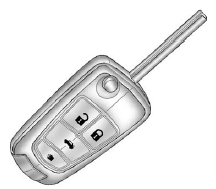
RKE Without Remote Start Shown The following may be available:
 (Lock): Press to lock all doors.
The turn signal indicators may flash and/or the horn may sound to indicate locking.
See “Remote Lock Feedback” under Vehicle Personalization on page 5‑33. If a passenger
door is open when
(Lock): Press to lock all doors.
The turn signal indicators may flash and/or the horn may sound to indicate locking.
See “Remote Lock Feedback” under Vehicle Personalization on page 5‑33. If a passenger
door is open when  is pressed, all doors
lock. If the driver door is open when
is pressed, all doors
lock. If the driver door is open when  is pressed, all doors lock except the driver door.
These settings can be modified.
See ЃgUnlocked Door Anti Lock OutЃh under Vehicle Personalization on page 5.33.
Pressing  may also arm the theft-deterrent
system. See Anti-theft Alarm System on page 2.13.
may also arm the theft-deterrent
system. See Anti-theft Alarm System on page 2.13.
 (Unlock): Press to unlock the driver
door or all doors. See ЃgRemote Door UnlockЃh under Vehicle Personalization on page
5.33. The turn signal indicators flash to indicate unlocking has occurred. For more
information see Remote Unlock Light Feedback under Vehicle Personalization on page
5.33.
(Unlock): Press to unlock the driver
door or all doors. See ЃgRemote Door UnlockЃh under Vehicle Personalization on page
5.33. The turn signal indicators flash to indicate unlocking has occurred. For more
information see Remote Unlock Light Feedback under Vehicle Personalization on page
5.33.
Pressing may also disarm the theft-deterrent
system. See Anti-theft Alarm System on page 2.13.
 (Remote Liftgate Release): First press
 , then press and hold
 to unlock the liftgate. For vehicles
with the power liftgate, press and hold
to unlock the liftgate. For vehicles
with the power liftgate, press and hold
 until the liftgate begins to move to
open the liftgate.
until the liftgate begins to move to
open the liftgate.
 (Vehicle Locator/Panic Alarm): Press
and release one time to locate the vehicle. The exterior lamps flash and the horn
chirps. Press and hold
(Vehicle Locator/Panic Alarm): Press
and release one time to locate the vehicle. The exterior lamps flash and the horn
chirps. Press and hold  for at least
two seconds to sound the panic alarm. The horn sounds and the turn signals flash
until
for at least
two seconds to sound the panic alarm. The horn sounds and the turn signals flash
until  is pressed again or the key is
placed in the ignition and turned to ON/RUN.
is pressed again or the key is
placed in the ignition and turned to ON/RUN.
 (Remote Vehicle Start): For vehicles
with this feature, first press
(Remote Vehicle Start): For vehicles
with this feature, first press  then
press and hold
then
press and hold  to start the engine
from outside the vehicle using the RKE transmitter. See Remote Vehicle Start on
page 2.5 for additional information. The buttons on the keys are disabled when there
is a key in the ignition.
to start the engine
from outside the vehicle using the RKE transmitter. See Remote Vehicle Start on
page 2.5 for additional information. The buttons on the keys are disabled when there
is a key in the ignition.
See also:
Features
For most shoppers, the key feature will be the standard third-row seat. It
has adequate room for children, but adults will not find it accommodating for
more than a short trip. An optional second- ...
Center Console Storage
For vehicles with a center console storage, use the lever (A) on the front to
open. ...
Throttle and Brake Pedal Adjustment
On vehicles with this feature, you can change the position of the throttle and brake pedals.
The control used to adjust the pedals is located on the instrument panel below the climate control sys ...