


Center High-Mounted Stoplamp (CHMSL) and Cargo Lamp
To replace one of these bulbs:
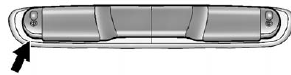
1. Remove the two screws and lift off the lamp assembly.
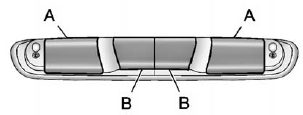 A. Cargo Lamp
B. Center High-Mounted Stoplamp (CHMSL) Bulb
2. On the reverse side of the lamp assembly, remove the bulb socket by turning it one quarter turn counterclockwise and pull it straight out.
3. Remove the bulb by pulling it straight out of the socket.
4. Install the bulb by pushing the bulb straight into the socket.
5. Install the bulb socket into the lamp asembly by turning it one quarter turn clockwise.
6. Reinstall the lamp assembly and tighten the screws.
See also:
Safety Belts
This section of the manual describes how to use safety belts properly. It also
describes some things not to do with safety belts.
WARNING
Do not let anyone ride where a safety belt cannot be worn ...
Lamps On Reminder
For vehicles with the lamps on reminder light, it comes on when the lights are
in use. ...
Sheet Metal Damage
If the vehicle is damaged and requires sheet metal repair or replacement, make sure the body repair shop applies anti-corrosion material to parts repaired or replaced to restore corrosion protection.
...