

Lane Departure Warning (LDW)
For vehicles with LDW, it is intended to help avoid unintentional lane departures. It may provide a warning if the vehicle is crossing a lane without using a turn signal. LDW uses a camera sensor to detect the lane markings. It only operates at speeds of 56 km (35 mph) or greater.
The LDW indicator, @, appears green if a lane marking is detected. It changes to amber, flashes, and sounds three chimes if the vehicle crosses a detected lane marking without using the turn signal.
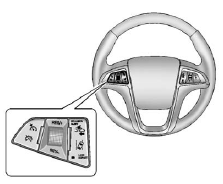
To turn LDW on and off, press the LANE DEPART button, located on the steering wheel.
See Lane Departure Warning (LDW) on page 9‑48 for more information.
See also:
Object Detection System Messages
FORWARD COLLISION ALERT OFF
If your vehicle has the Forward Collision Alert (FCA) system, this message may
display if the FCA system cannot activate due to a temporary condition. See Forward
Coll ...
Stopping and Resuming Playback
To stop playing a DVD without turning off the system, press the button on the remote control, or press the softkey located under the or the
tabs displayed on the radio. If the radio is sourced to ...
Buying New Tires
GM has developed and matched specific tires for the vehicle. The original equipment tires installed were designed to meet General Motors Tire Performance Criteria Specification (TPC Spec) system ratin ...