


Trailer Brake Control Panel
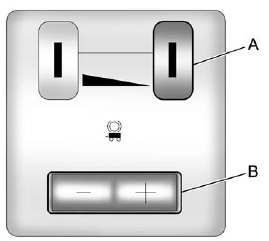
A. Manual Trailer Brake Apply Lever
B. Trailer Gain Adjustment Buttons
The ITBC system has a control panel located on the instrument panel to the left of the steering column. See Instrument Panel (Base/Uplevel Version) on page 1‑2 or Instrument Panel (Premium Version) on page 1‑6 for more information. The control panel allows adjustment to the amount of output, referred to as trailer gain, available to the electric trailer brakes and allows manual application of the trailer brakes. The Trailer Brake Control Panel is used along with the Trailer Brake Display Page on the DIC to adjust and display power output to the trailer brakes.
See also:
Remote Keyless Entry (RKE) System
See Radio Frequency Statement on page 13‑21 for information regarding Part 15
of the Federal Communications Commission (FCC) rules and Industry Canada Standards
RSS-GEN/210/220/310.
If ther ...
Power Outlets
The vehicle has 12-volt accessory power outlets which can be used to plug in electrical equipment, such as a cell phone or MP3 player.
The power outlets are located:
• On the instrument panel belo ...
Folding the Seatback
To fold the second row seatbacks:
1. Remove anything on or under the seat.
2. Place the armrest in the upright position, and unfasten the safety belt.
3. Pull forward on the reclining seatback stra ...