


Steering Wheel Controls
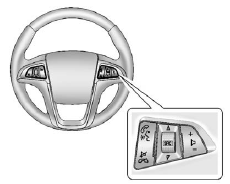
Some audio steering wheel controls can be adjusted at the steering wheel.
 : Press to interact with the available
Bluetooth or OnStar systems.
: Press to interact with the available
Bluetooth or OnStar systems.
 : Press to silence the vehicle speakers
only. Press again to turn the sound on. For vehicles with OnStar or Bluetooth systems,
press to reject an incoming call, or end a current call.
: Press to silence the vehicle speakers
only. Press again to turn the sound on. For vehicles with OnStar or Bluetooth systems,
press to reject an incoming call, or end a current call.
 : Press to select an audio source.
Toggle up or down to select the next or previous favorite radio station, CD, or MP3 track.
 : Press + to increase the volume;
press − to decrease the volume.
: Press + to increase the volume;
press − to decrease the volume.
See also:
Blizzard Conditions
Being stuck in snow can be a serious situation. Stay with the vehicle unless there is help nearby.
If possible, use the Roadside Assistance Program (U.S. and Canada) on page 13‑8 or Roadside As ...
When to Check Power Steering Fluid
It is not necessary to regularly check power steering fluid unless you suspect there is a leak in the system or you hear an unusual noise. A fluid loss in this system could indicate a problem. Have th ...
Driving Impressions
The overriding thing that struck me was how small the Acadia feels when you
drive it. Make no mistake, this is a big vehicle, but it doesn't feel that way,
and that's a good thing. It's easy to ju ...