


Disconnecting the RVC
The rear vision camera must be disconnected if the tailgate needs to be removed.
To disconnect the camera:
1. Remove the license plate.
2. Disconnect the camera connectors from the chassis harness, located behind the license plate, by pressing on the release tab on each connector.
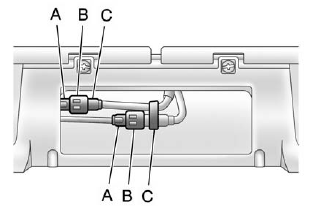
A. Chassis harness connector
B. Release tab
C. Camera connector
3. Plug the two exposed chassis harness connectors together to prevent contamination.
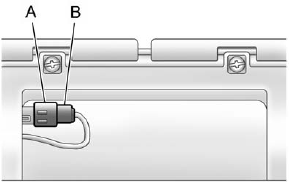
A. Chassis harness connector
B. Release tab
4. Feed the wiring harness through the pickup box, then plug the camera connectors together to prevent contamination.
5. Remove the tailgate. See Tailgate on page 2‑10 for more information.
6. Reinstall the license plate.
Reverse this procedure to reinstall the RVC and make sure the grommet and connection are secure.
See also:
Trip Odometer
Press the trip odometer reset stem until TRIP displays. This display shows the current distance traveled in either kilometers (km) or miles (mi) since the last reset for the trip odometer.
The trip o ...
Vehicle Data Recording and Privacy
This GM vehicle has a number of sophisticated computers that record information about the vehicle’s performance and how it is driven.
For example, the vehicle uses computer modules to monitor and c ...
Reducing Speed While Using Cruise Control
If the cruise control system is already activated:
• Press and hold the SET– button on the steering wheel until the lower speed desired is reached, then release it.
• To slow down in small amo ...