


Turning the RVC System On or Off
To turn the RVC system on or off:
1. Shift into P (Park).
2. Press MENU to enter the configure menu options. Turn the Multifunction knob until the Display feature is highlighted and press the Multifunction knob. Or press the Display screen button 3. Select the Rear Camera Options screen button. The Rear Camera Options screen displays.
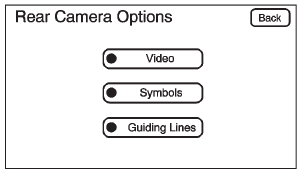
4. Select the Video screen button.
When the Video screen button is highlighted the RVC system is on.
The delay after shifting out of R (Reverse) is approximately 10 seconds. The delay can be canceled by performing one of the following:
• Pressing a hard key on the navigation system.
• Shifting into P (Park).
• Reaching a vehicle speed of 8 km/h (5 mph).
See also:
Setting the Clock
To set the time and date:
1. Turn the ignition key to ACC/ ACCESSORY or ON/RUN, then press
, to turn the radio on.
2. Press
to display HR, MIN, MM, DD, and YYYY (hour, minute, month, day, and yea ...
When Should an Airbag Inflate?
Frontal airbags are designed to inflate in moderate to severe frontal or near-frontal
crashes to help reduce the potential for severe injuries mainly to the driver's
or right front passenger&# ...
Automatic Operation
AUTO (Automatic): When automatic operation is active, the system controls the inside temperature, the air delivery, and the fan speed.
Use the steps below to place the entire system in automatic mode ...