


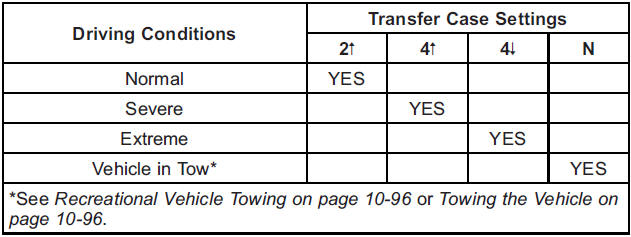
Recommended Transfer Case Settings
Notice: Driving on clean, dry pavement in four-wheel drive for an extended period of time can cause premature wear on the vehicle's powertrain. Do not drive on clean, dry pavement in Four-Wheel Drive for extended periods of time.
4  (Four-Wheel Drive Low): This setting also engages the front axle and delivers extra torque. You may never need Four-Wheel Drive Low.
It sends maximum power to all four wheels. You might choose Four-Wheel Drive Low if you are driving off-road in deep sand, deep mud, deep snow, and while climbing or descending steep hills.
If the vehicle has StabiliTrak®, shifting into Four-Wheel Drive Low will turn Traction Control and StabiliTrak off. See StabiliTrak® System on page 9‑59.

A parking brake symbol is located next to the N (Neutral) symbol as a reminder to set the parking brake before shifting the transfer case into N (Neutral).
WARNING
Shifting the transfer case to N (Neutral) can cause the vehicle to roll even if the transmission is in P (Park). You or someone else could be seriously injured. Be sure to set the parking brake before placing the transfer case in N (Neutral). See Parking Brake on page 9‑58.
N (Neutral): Shift to this setting only when the vehicle needs to be towed. See Recreational Vehicle Towing on page 10‑96 or Towing the Vehicle on page 10‑96.
2  (Two-Wheel Drive High): This setting is used for driving in most street and highway situations.
The front axle is not engaged in two-wheel drive. This setting also provides the best fuel economy.
4 (Four-Wheel Drive High): Use this setting when you need extra traction, such as on snowy or icy roads or in most off-road situations.
This setting also engages the front axle to help drive your vehicle. This is the best setting to use when plowing snow.
You can shift from Two-Wheel Drive High to Four-Wheel Drive High or Four-Wheel Drive High to Two-Wheel Drive High while the vehicle is moving. In extremely cold weather, it may be necessary to stop or slow the vehicle to shift into Four-Wheel Drive High.
See also:
Engine Fan
If the vehicle has a clutched engine cooling fan, when the clutch is engaged, the fan spins faster to provide more air to cool the engine.
In most everyday driving conditions, the fan is spinning slo ...
CD Messages
Optical Error: The disc was inserted upside down.
Disk Read Error: A disc was inserted with an invalid or unknown format.
Player Error: There are disc LOAD or disc EJECT problems.
• It is very ho ...
Clock
To set the time:
1. Press the CONFIG button to enter the menu options. Turn the TUNE/MENU knob
to scroll through the available setup features. Press the TUNE/MENU knob or press
the Time screen bu ...