


Truck-Camper Loading Information
A vehicle-specific Truck-Camper Loading Information label is attached to the inside of the vehicle's glove box. This label indicates if a slide-in camper can be carried, how much of a load the vehicle can carry, and how to correctly spread out the load. It will help to match the right slide in camper to the vehicle.
Your dealer can help make a good vehicle-camper match and help determine the Cargo Weight Rating (CWR).
When installing and loading a slide-in camper, check the manufacturer's instructions.
When carrying a slide-in camper, the total cargo load of the vehicle is the weight of the camper, plus the following:
• Everything added to the camper after it left the factory
• Everything in the camper
• All the people inside
The CWR is the maximum weight of the load the vehicle can carry. It does not include the weight of the people inside. But, use about 68 kg (150 lbs) for each seat.
The total cargo load must not be more than the vehicle's CWR.
Refer to the Truck-Camper Loading Information label in the glove box for dimensions A and B as shown in the following illustration.
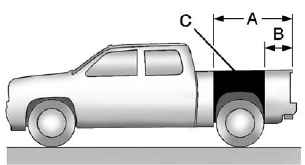
Use the rear edge of the load floor for measurement purposes.
The recommended location for the cargo center of gravity is at point C for the CWR. It is the point where the mass of a body is concentrated and, if suspended at that point, would balance the front and rear.
Here is an example of proper truck and camper match:
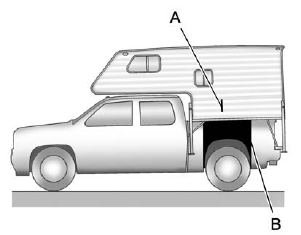
A. Camper Center of Gravity
B. Recommended Center of Gravity Location Zone
When the truck is used to carry a slide-in camper, the total cargo load of the truck consists of the manufacturer's camper weight figure, the weight of installed additional camper equipment not included in the manufacturer's camper weight figure, the weight of camper cargo, and the weight of passengers in the camper.
The total cargo load should not exceed the truck's cargo weight rating, and the camper's center of gravity (A) should fall within the truck's recommended center of gravity zone (B) when installed.
Any accessories or other equipment that are added to the vehicle must be weighed. Then, subtract this extra weight from the CWR. This extra weight may shorten the center of gravity zone of the vehicle.
If the slide-in camper and its load weighs less than the CWR, the center of gravity zone for your vehicle may be larger.
Secure loose items to prevent weight shifts that could affect the balance of the vehicle. When the truck-camper is loaded, drive to a scale and weigh on the front and on the rear wheels separately to determine axle loads. Individual axle loads should not exceed either of the gross axle weight ratings (GAWR). The total axle loads should not exceed your vehicle's gross vehicle weight rating (GVWR). These ratings are given on the vehicle certification label attached to the rear edge of the driver door. See “Certification/Tire Label” under Vehicle Load Limits on page 9‑17. If weight ratings are exceeded, move or remove items to bring all weights below the ratings.
See your dealer for more information on curb weights, cargo weights, Cargo Weight Rating and the correct center of gravity zone.
See also:
Audio Output
Only one audio source can be heard through the speakers at one time.
An audio source is defined as DVD slot, CD slot, XM, FM-AM, front auxiliary jack, USB port, or rear auxiliary jack.
Press the O b ...
Transfer Case
Refer to the Maintenance Schedule to determine how often to check the lubricant
and when to change it. See Maintenance Schedule on page 11‑3. ...
Engine Cover
Engine Cover 3.0L V6
A. Oil Fill Cap
B. Engine Cover Bolt
C. Engine Cover
To remove:
1. Remove the oil fill cap (A).
2. Remove the engine cover bolt (B).
3. Raise the engine cover (C) to rele ...