


Remote Control
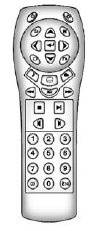
To use the remote control, aim it at the transmitter window at the rear of the RSE overhead console and press the desired button. Direct sunlight or very bright light could affect the ability of the RSE transmitter to receive signals from the remote control. If the remote control does not seem to be working, the batteries might need to be replaced. See “Battery Replacement” later in this section.
Objects blocking the line of sight could also affect the function of the remote control.
If a CD or DVD is in the Radio DVD slot, the remote control O (power) button can be used to turn on the video screen display and start the disc. The radio can also turn on the video screen display. See Operation on page 7‑3 for more information.
Notice: Storing the remote control in a hot area or in direct sunlight can damage it, and the repairs will not be covered by the warranty. Storage in extreme cold can weaken the batteries. Keep the remote control stored in a cool, dry place.
If the remote control becomes lost or damaged, a new universal remote control can be purchased.
If this happens, make sure the universal remote control uses a code set of Toshiba®.
See also:
Belts
• Belts may need replacing if they squeak or show signs of cracking or splitting.
• Trained dealer technicians can inspect the belts and recommend replacement when necessary. ...
Reclining the Seatbacks
To recline the seatback:
1. Leaning forward in the seat, pull the reclining seatback strap (B).
2. Move the seatback to the desired position, and then release the strap to lock the seatback in place ...
Transmission Temperature
Press the trip/fuel button until TRANS TEMP displays. This display shows the temperature of the automatic transmission fluid in either degrees Celsius (°C) or degrees Fahrenheit (°F). ...