


Headphones
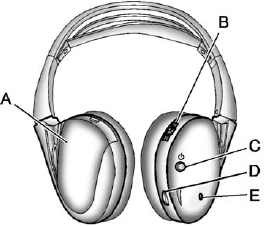
A. Battery cover
B. Channel 1 or 2 switch
C. Power button
D. Volume control
E. Power indicator light
The RSE includes two 2-channel wireless headphones that are dedicated to this system. Channel 1 is dedicated to the video screen, while Channel 2 is dedicated to Rear Seat Audio (RSA) selections.
These headphones can be used to listen to the radio, CDs, DVDs, MP3s, DVD-As, or any auxiliary source connected to A/V jacks or the auxiliary input jack, if the vehicle has this feature. The wireless headphones have a power button, channel 1 or 2 switch, and a volume control.
Push the power button to turn on the headphones. An indicator light located on the headphones comes on. If the light comes on, but there is intermittent sound and/or static on the headphones, or if the indicator light does not come on, the batteries might need to be replaced. See “Battery Replacement” later in this section for more information. Switch the headphones to Off when not in use.
Infrared transmitters are located at the rear of the overhead console.
The headphones shut off automatically to save the battery power if the RSE system and RSA are shut off, or if the headphones are out of range of the transmitters for more than three minutes. If you move too far forward or step out of the vehicle, the headphones lose the audio signal.
To adjust the volume on the headphones, use the volume control located on the right side.
For optimal audio performance, the headphones must be worn correctly.
Headphones should be worn with the headband over the top of the head for best audio reception. The symbol L (Left) appears on the outside bottom edge of the ear cup and should be positioned on the left ear. The symbol R (Right) appears on the outside bottom edge of the ear cup and should be positioned on the right ear.
Notice: Do not store the headphones in heat or direct sunlight. This could damage the headphones and repairs will not be covered by the warranty.
Storage in extreme cold can weaken the batteries. Keep the headphones stored in a cool, dry place.
If the foam ear pads attached to the headphones become worn or damaged, the pads can be replaced separately from the headphone set.
To purchase replacement ear pads, call 1-888-293-3332, then prompt zero (0), or contact your dealer.
See also:
Safety Chains
Always attach chains between the vehicle and the trailer. Cross the safety chains under the tongue of the trailer to help prevent the tongue from contacting the road if it becomes separated from the h ...
Power Reclining Seatbacks
To adjust a power seatback, if available:
○ Tilt the top of the control rearward to recline.
○ Tilt the top of the control forward to raise. ...
Power Lumbar
Power Lumbar
To adjust the power lumbar support, if equipped:
• On vehicles with two-way lumbar, press and hold the top or bottom of the control to increase or decrease lumbar support.
• On v ...