


Instrument Panel Illumination Control
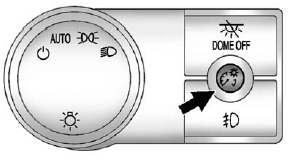
 (Instrument Panel Brightness): This feature controls the brightness of the instrument panel lights and is located next to the exterior lamps control.
Push the knob to extend out and then it can be turned.
Turn the knob clockwise or counterclockwise to brighten or dim the instrument panel lights. Turning the knob to the farthest clockwise position turns on the dome lamps.
See also:
Symbols
The navigation system may have a feature that lets the driver view symbols on the navigation screen while using the rear vision camera.
The Ultrasonic Rear Park Assist (URPA) system must not be disab ...
Passenger Airbag Status Indicator
The vehicle has a passenger sensing system. See Passenger Sensing System on page
3‑28 for important safety information. The overhead console has a passenger airbag
status indicator.
Unite ...
How Does an Airbag Restrain?
In moderate to severe frontal or near frontal collisions, even belted occupants can contact the steering wheel or the instrument panel. In moderate to severe side collisions, even belted occupants can ...