


Turn and Lane-Change Signals
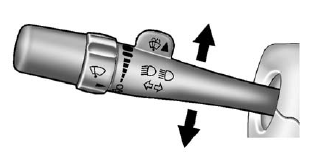
An arrow on the instrument panel cluster flashes in the direction of the turn or lane change.
Move the lever all the way up or down to signal a turn.
Raise or lower the lever for less than one second until the arrow starts to flash to signal a lane change. This causes the turn signals to automatically flash three times. It will flash six times if tow-haul mode is active. Holding the turn signal lever for more than one second will cause the turn signals to flash until you release the lever.
The lever returns to its starting position whenever it is released.
If after signaling a turn or a lane change the arrows flash rapidly or do not come on, a signal bulb could be burned out.
Have the bulbs replaced. If the bulb is not burned out, check the fuse.
See Fuses and Circuit Breakers on page 10‑47.
Turn Signal On Chime
If the turn signal is left on for more than 1.2 km (0.75 mi), a chime will sound at each flash of the turn signal and the message TURN SIGNAL ON will also appear in the Driver Information Control (DIC). To turn the chime and message off, move the turn signal lever to the off position.
See also:
Hill and Mountain Roads
Driving on steep hills or through mountains is different than driving on flat
or rolling terrain. Tips for driving in these conditions include:
○ Keep the vehicle serviced and in good shape.
...
How OnStar Service Works
Automatic Crash Response, Emergency Services, Crisis Assist, Stolen Vehicle Assistance, Vehicle Diagnostics, Remote Door Unlock, Roadside Assistance, Turn-by-Turn Navigation, and Hands-Free Calling ar ...
Weight of the Trailer Tongue
The tongue load (A) of any trailer is an important weight to measure because it affects the total gross weight of the vehicle. The Gross Vehicle Weight (GVW) includes the curb weight of the vehicle, a ...