


DIC Buttons
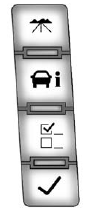
The buttons are the trip/fuel, vehicle information, customization, and set/ reset buttons. The button functions are detailed in the following pages.
 (Trip/Fuel): Press this button to display the odometer, trip odometer, fuel range, average economy, fuel used, timer, transmission temperature, and instantaneous economy and Active Fuel Management™ indicator. The compass and outside temperature will also be shown in the display.
The temperature will be shown in °C or °F depending on the units selected.
 (Vehicle Information): Press this button to display the oil life, units, tire pressure readings for vehicles with the Tire Pressure Monitor System (TPMS), trailer brake gain and output information for vehicles with the Integrated Trailer Brake Control (ITBC) system, engine hours, compass zone setting, and compass recalibration.
 (Customization): Press this button to customize the feature settings on the vehicle. See Vehicle Personalization (With DIC Buttons) on page 5‑52 for more information.
 (Set/Reset): Press this button to set or reset certain functions and to turn off or acknowledge messages on the DIC.
See also:
Recreational Vehicle Towing
Recreational vehicle towing means towing the vehicle behind another vehicle –
such as behind a motor home. The two most common types of recreational vehicle towing
are known as dinghy towing and ...
Battery Voltage and Charging Messages
BATTERY SAVER ACTIVE
This message displays when the vehicle has detected that the battery voltage
is dropping beyond a reasonable point. The battery saver system starts reducing
certain features ...
Audio Output
Audio from the DVD player or auxiliary inputs can be heard through the following possible sources:
• Wireless headphones
• Vehicle speakers
• Vehicle-wired headphone jacks on the RSA system, ...