


Antilock Brake System (ABS) Warning Light
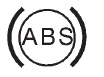
For vehicles with the Antilock Brake System (ABS), this light comes on briefly when the engine is started.
If it does not, have the vehicle serviced by your dealer. If the system is working normally the indicator light then goes off.
If the ABS light stays on, turn the ignition off. If the light comes on while driving, stop as soon as it is safely possible and turn the ignition off. Then start the engine again to reset the system. If the ABS light stays on, or comes on again while driving, the vehicle needs service.
If the regular brake system warning light is not on, the vehicle still has brakes, but not antilock brakes.
If the regular brake system warning light is also on, the vehicle does not have antilock brakes and there is a problem with the regular brakes.
See Brake System Warning Light on page 5‑27.
For vehicles with a Driver Information Center (DIC), see Brake System Messages on page 5‑43 for all brake-related DIC messages.
If the vehicle is a hybrid, see the hybrid supplement for more information.
See also:
Audio/Video (A/V) Jacks
If available, the A/V jacks are located on the rear of the floor console. They
allow audio or video cables to be connected from an auxiliary device such as a camcorder
or a video game system. The ...
Passing
More passing distance is needed when towing a trailer. The combination will not accelerate as quickly and is longer so it is necessary to go much farther beyond the passed vehicle before returning to ...
How to Reset the Engine Oil Life System
Reset the system whenever the engine oil is changed so that the system can calculate
the next engine oil change. To reset the system:
1. Turn the ignition to ON/RUN, with the engine off.
2. Press ...