


Brake System Warning Light
With the ignition on, the brake system warning light comes on when the parking brake is set. If the vehicle is driven with the parking brake engaged, a chime sounds when the vehicle speed is greater than 8 km/h (5 mph).
The vehicle brake system consists of two hydraulic circuits. If one circuit is not working, the remaining circuit can still work to stop the vehicle. For normal braking performance, both circuits need to be working.
If the warning light comes on and a chime sounds there could be a brake problem. Have the brake system inspected right away.
This light can also come on due to low brake fluid. See Brake Fluid on page 10‑30 for more information.
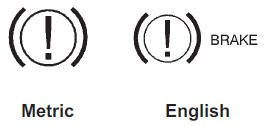
This light comes on briefly when the ignition key is turned to ON/RUN.
If it does not come on then, have it fixed so it is ready to warn if there is a problem.
WARNING
The brake system might not be working properly if the brake system warning light is on.
Driving with the brake system warning light on can lead to a crash. If the light is still on after the vehicle has been pulled off the road and carefully stopped, have the vehicle towed for service.
If the light comes on while driving, pull off the road and stop carefully.
The pedal might be harder to push or might go closer to the floor. It can take longer to stop. If the light is still on, have the vehicle towed for service. See Towing the Vehicle on page 10‑96.
If the vehicle is a hybrid, see the hybrid supplement for more information.
See also:
Folding the Seatback
To fold the second row seatbacks:
1. Remove anything on or under the seat.
2. Place the armrest in the upright position, and unfasten the safety belt.
3. Pull forward on the reclining seatback stra ...
Audio Output
Audio from the DVD player or auxiliary inputs can be heard through the following:
○ Wireless Headphones
○ Vehicle Speakers
The RSE system transmits the audio signal to the wireless head ...
Automatic Transmission
The automatic transmission has a shift lever located on the console between the seats.
P (Park): This position locks the front wheels. It is the best position to use when starting the engine becaus ...