


Steering Wheel Controls
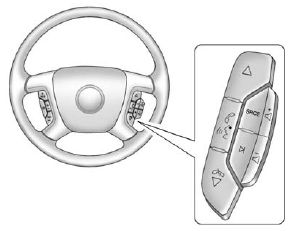
If equipped, some audio controls can be adjusted at the steering wheel.
 (Next) : Press to go to the next favorite radio station, track on a CD, or folder on an iPod® or USB device.
 (Previous/End): Press to go to the previous favorite radio station, track on a CD, or folder on an iPod® or USB device. Press to reject an incoming call, or end a current call.
See also:
Object Detection System Messages
FORWARD COLLISION ALERT OFF
If your vehicle has the Forward Collision Alert (FCA) system, this message may
display if the FCA system cannot activate due to a temporary condition. See Forward
Coll ...
Adding Equipment to the Airbag-Equipped Vehicle
Q: Is there anything I might add to or change about the vehicle that could keep the airbags from working properly?
A: Yes. If you add things that change your vehicle's frame, bumper system, height, f ...
Rear Seat Entertainment (RSE) System
The vehicle may have a DVD Rear Seat Entertainment (RSE) system.
The RSE system works with the vehicle's audio system. The DVD player is part of the front radio.
The RSE system includes a radio with ...