


Power Lumbar
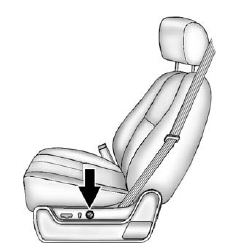
Power Lumbar
To adjust the power lumbar support, if equipped:
• On vehicles with two-way lumbar, press and hold the top or bottom of the control to increase or decrease lumbar support.
• On vehicles with four-way lumbar, press and hold the front or rear of the control to increase or decrease lumbar support. To raise or lower the height of the support, press and hold the top or bottom of the control.
See also:
Cargo & Towing
The Yukon Denali is a spacious three-row SUV for people, but that's it. If
there are six people and no cargo, the Yukon is a terrific place to be. If you
have a lot of cargo — you know, like lug ...
Interior Mirror
The automatic dimming rearview mirror reduces the glare from other vehicle headlamps. Each time the vehicle is started, the dimming feature comes on.
See Automatic Dimming Rearview Mirror on page 2&# ...
Crew Cab
A. Open or Close
B. Vent
On vehicles with a sunroof, the sunroof only operates when the ignition is in the ACC/ACCESSORY or ON/RUN or the Retained Accessory Power (RAP) is active.
See Retained Ac ...