


Front Seats
The front seats have adjustable head restraints in the outboard seating positions.
WARNING
With head restraints that are not installed and adjusted properly, there is a greater chance that occupants will suffer a neck/ spinal injury in a crash. Do not drive until the head restraints for all occupants are installed and adjusted properly.
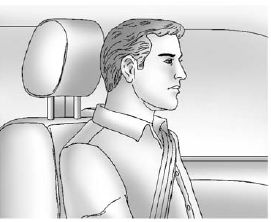
Adjust the head restraint so that the top of the restraint is at the same height as the top of the occupant's head. This position reduces the chance of a neck injury in a crash.
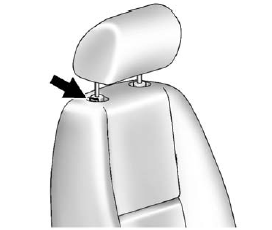
The height of the head restraint can be adjusted. Pull the head restraint up to raise it. Try to move the head restraint to make sure that it is locked in place.
To lower the head restraint, press the button, located on the top of the seatback, and push the restraint down. Try to move the head restraint after the button is released to make sure that it is locked in place.
The front seat outboard head restraints are not designed to be removed.
See also:
Cleaning the Video Screen
When cleaning the video screen, use only a clean cloth dampened with clean water. Use care when directly touching or cleaning the screen, as damage could result. ...
The Inside
SUV fans should find plenty of familiar goodies: a high seating position,
excellent forward sightlines — albeit a hefty blind spot in back — and room to
stretch out. I found our tester's leath ...
Remote Start Ready
If the vehicle does not have the remote vehicle start feature, it may have the remote start ready feature.
This feature allows your dealer to add the manufacturer's remote vehicle start feature.
See ...