


Driver Information Center (DIC)
The DIC display is located at the bottom of the instrument panel cluster. It shows the status of many vehicle systems and enables access to the personalization menu.
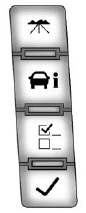
The DIC buttons are located on the instrument panel, next to the steering wheel.
Some vehicles do not have the buttons shown, however some of the menus can be viewed by using the trip odometer reset stem.
 : Press to display the odometer, trip odometer, fuel range, average economy, fuel used, timer, instantaneous economy and Active Fuel Management™ indicator, and transmission temperature. The compass and outside air temperature will also be shown in the display. The temperature will be shown in °C or °F depending on the units selected.
 : Press to display the oil life, units, tire pressure readings for vehicles with the Tire Pressure Monitor System (TPMS), trailer brake gain and output information for vehicles with the Integrated Trailer Brake Control (ITBC) system, engine hours, compass zone setting, and compass recalibration.
 : Press to customize the feature settings on your vehicle. See Vehicle Personalization (With DIC Buttons) on page 5‑52 for more information.
 : Press to set or reset certain functions and to turn off or acknowledge messages on the DIC.
For more information, see Driver Information Center (DIC) on page 5‑33.
See also:
What Makes an Airbag Inflate?
In a deployment event, the sensing system sends an electrical signal triggering a release of gas from the inflator. Gas from the inflator fills the airbag causing the bag to break out of the cover and ...
Total Weight on the Vehicle's Tires
Be sure the vehicle's tires are inflated to the inflation pressures found on the Certification Tire label on the drivers door or see Vehicle Load Limits on page 9‑17 for more information. Make s ...
Buying New Tires
GM has developed and matched specific tires for the vehicle. The original equipment
tires installed were designed to meet General Motors Tire Performance Criteria Specification
(TPC Spec) system r ...