


Steering Wheel Controls
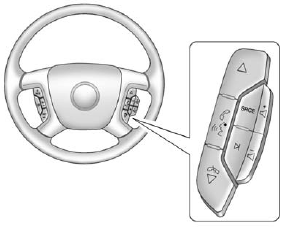
Steering Wheel Controls
If available, some audio controls can be adjusted at the steering wheel.
 : Press to go to the next favorite radio station, track on a CD, or folder on an iPod® or USB device.
 : Press to go to the previous favorite radio station, track on a CD, or folder on an iPod® or USB device. Press to reject an incoming call, or to end a call.
 : Press to silence the vehicle speakers only. Press again to turn the sound on. Press and hold longer than two seconds to interact with OnStar® or Bluetooth systems, if equipped.
 : Press to increase volume.
 : Press to decrease volume.
SRCE: Press to switch between the radio and CD, and for equipped vehicles, the DVD, front auxiliary, and rear auxiliary.
 : Press to seek the next radio station, the next track or chapter while sourced to the CD or DVD slot, or to select tracks and folders on an iPod or USB device.
For more information, see Steering Wheel Controls on page 5‑3.
See also:
Securing Child Restraints (Right Front Passenger Seat)
The vehicle has airbags. A rear seat is a safer place to secure a forward-facing child restraint.
See Where to Put the Restraint on page 3‑44.
In addition, the vehicle has a passenger sensing ...
Entry Lighting
The dome lamp, cargo lamp, and foot lamp inside the vehicle come on when any
door is opened, if the dome lamp is in the door position. In addition, these lamps
come on when the Remote Keyless Entr ...
Parade Dimming
This feature automatically prohibits the dimming of the instrument panel displays in daylight while the headlamps are on so that the displays are still able to be seen. ...