


Turning the Rear Vision Camera System On or Off
To turn the rear vision camera system on or off:
1. Shift into P (Park).
2. Press the MENU button to enter the configure menu options, then press the MENU hard key to select Display or touch the Display screen button.
3. Select the Rear Camera Options screen button. The Rear Camera Options screen displays.
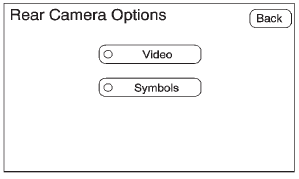
4. Select the Video screen button.
When the Video screen button is highlighted the RVC system is on.
The delay received after shifting out of R (Reverse) is approximately 10 seconds. The delay can be canceled by performing one of the following:
• Pressing a hard key on the navigation system.
• Shifting into P (Park).
• Reach a vehicle speed of 5 mph (8 km/h).
There is a message on the rear vision camera screen that states “Check Surroundings for Safety.”
See also:
Why Safety Belts Work
When riding in a vehicle, you travel as fast as the vehicle does. If the vehicle stops suddenly, you keep going until something stops you.
It could be the windshield, the instrument panel, or the s ...
Wiper Blade Replacement
Windshield wiper blades should be inspected for wear or cracking. See Maintenance Schedule on page 11‑3 for more information on wiper blade inspection.
Replacement blades come in different type ...
Entry Lighting
The dome lamp, cargo lamp, and foot lamp inside the vehicle come on when any
door is opened, if the dome lamp is in the door position. In addition, these lamps
come on when the Remote Keyless Entr ...