


Rear Audio Controller (RAC)
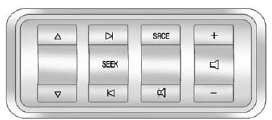
The vehicle may have the Rear Audio Controller (RAC). Certain radio functions can be controlled with the RAC.
 or
or  (Next/Previous): Press the up or down arrows to go to the next or to the previous radio station stored as a favorite.
When a CD/DVD is playing, press the up or down arrows to go to the next or previous track or chapter.
 SEEK
SEEK  : Press the SEEK arrows to go to the next or to the previous radio station while in AM or FM. Press the SEEK arrows to go to the next or the previous track or chapter while sourced to a CD or DVD slot.
SRCE (Source): Press this button to switch between the radio, CD, and if the vehicle has these features, DVD, front auxiliary, and rear auxiliary.
 (Mute): Press this button to silence the system. Press this button again, or any other radio button, to turn the sound on.
 (Volume): Press the plus or minus volume buttons to increase or to decrease the volume.
See also:
Adding and Removing Categories
Categories cannot be added or removed while the vehicle is moving faster than 8 km/h (5 mph).
To add or remove a category:
1. Press the MENU button.
2. Press the softkey located below the XM CAT ta ...
Floor Mats
WARNING
If a floor mat is the wrong size or is not properly installed, it can interfere with the pedals.
Interference with the pedals can cause unintended acceleration and/or increased stopping dist ...
Power Door Locks
If available, the switches are on the front doors.
: Press to unlock the doors.
: Press to lock the doors. ...