


Connecting a USB Storage Device or iPod®
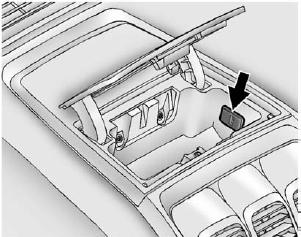
To connect a USB storage device, connect the device to the USB port located in the instrument panel storage area. See Instrument Panel Storage on page 4‑1 for more information.
The USB port can be used to control an iPod or a USB storage device.
To connect an iPod, connect one end of the USB cable that came with the iPod to the iPod’s dock connector, and connect the other end to the USB port located in the instrument panel storage area.
If the vehicle is on and the USB connection works, “OK to disconnect” and a GM logo may appear on the iPod, and iPod appears on the radio's display.
The iPod music appears on the radio’s display and begins playing.
The iPod charges while it is connected to the vehicle if the vehicle is in the ACC/ACCESSORY or ON/RUN position. When the vehicle is turned off, the iPod automatically powers off and will not charge or draw power from the vehicle's battery.
If you have an older iPod model that is not supported, it can still be used by connecting it to the auxiliary input jack using a standard 3.5 mm (1/8 in) stereo cable. See Clock on page 5‑8 for more information.
See also:
When to Inspect the Engine Air Cleaner/Filter
Inspect or replace the air cleaner/ filter at the scheduled maintenance intervals.
See Maintenance Schedule on page 11‑3 for more information. If driving in dusty/dirty
conditions, inspect t ...
Playing a CD-R or CD-RW MP3
(Tune): Turn to select MP3/WMA files.
SEEK: Press to go to the start of the track, if more than 10 seconds have played. Press and hold or press multiple times to continue moving backward through tr ...
Underbody Maintenance
Use plain water to flush dirt and debris from the vehicle's underbody.
Your dealer or an underbody car washing system can do this. If not removed, rust and corrosion can develop. ...