


Connecting a USB Storage Device or iPod®
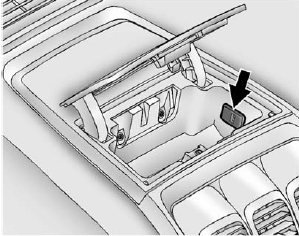
To connect a USB storage device, connect the device to the USB port located in the instrument panel storage area. See Instrument Panel Storage on page 4‑1 for more information.
The USB port can be used to control an iPod or a USB storage device.
To connect an iPod, connect one end of the USB cable that came with the iPod to the iPod’s dock connector and connect the other end to the USB port located in the instrument panel storage area.
If the vehicle is on and the USB connection works, “OK to disconnect” and a GM logo may appear on the iPod, and iPod appears on the radio's display.
The iPod music appears on the radio’s display and begins playing.
The iPod charges while it is connected to the vehicle if the vehicle is in the ACC/ACCESSORY or ON/RUN position. When the vehicle is turned off, the iPod automatically powers off and will not charge or draw power from the vehicle's battery.
If you have an older iPod model that is not supported, it can still be used by connecting it to the Auxiliary Input Jack using a standard 3.5 mm (1/8 in) stereo cable. See Clock on page 5‑8 for more information.
See also:
Vehicle Overview
The GMC Canyon is a twin to the Chevrolet Colorado. The GMC versions are
priced slightly higher than the Chevys, and that gets buyers more-contemporary
styling and a refined interior. Mechanically ...
Storing a Radio Station as a Favorite
Drivers are encouraged to set up their radio station favorites while the vehicle is in P (Park). Tune to favorite stations using the presets, favorites button, and steering wheel controls. See Steerin ...
Increasing Speed While Using Cruise Control
If the cruise control system is already activated, . Press and hold the +RES button on the steering wheel until the desired speed is reached, then release it.
• To increase vehicle speed in small a ...