


Erasing Universal Remote Buttons
All programmed buttons should be erased when the vehicle is sold or the lease ends.
To erase all programmed buttons on the Universal Remote device:
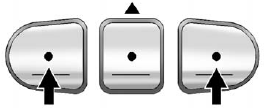
1. Press and hold down the two outside buttons until the indicator light begins to flash, after 20 seconds.
2. Release both buttons.
See also:
Retrieve My Number
1. Push . System responds:
“OnStar ready.” 2. Say “My Number.” System responds: “Your OnStar Hands-Free Calling number is.” ...
Heated Seats
Uplevel Climate Control System Shown, Base Similar
If available, the buttons are near the climate controls. To operate, the ignition
must be in ON/RUN.
Press or
to heat the driver or passenge ...
Additional Maintenance and Care
Your vehicle is an important investment and caring for it properly may help to
avoid future costly repairs. To maintain vehicle performance, additional maintenance
services may be required. It is ...