


Universal Remote System Programming
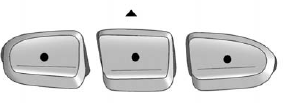
This system provides a way to replace up to three remote control transmitters used to activate devices such as garage door openers, security systems, and home automation devices.
Do not use the Universal Home Remote with any garage door opener that does not have the stop and reverse feature. This includes any garage door opener model manufactured before April 1, 1982.
Read the instructions completely before attempting to program the Universal Home Remote. Because of the steps involved, it may be helpful to have another person available to assist you with programming the Universal Home Remote.
Keep the original hand-held transmitter for use in other vehicles as well as for future Universal Home Remote programming.
It is also recommended that upon the sale of the vehicle, the programmed Universal Home Remote buttons should be erased for security purposes. See “Erasing Universal Home Remote Buttons” later in this section.
When programming a garage door, park outside of the garage. Park directly in line with and facing the garage door opener motor-head or gate motor-head. Be sure that people and objects are clear of the garage door or gate that is being programmed.
It is recommended that a new battery be installed in your hand-held transmitter for quicker and more accurate transmission of the radio-frequency signal.
See also:
Loading Points
A. Primary Load Points
B. Secondary Load Areas
C. Cargo Management Option Holes
Structural members (A) and (B) are included in the pick-up box design.
Additional accessories should use these loa ...
USB Supported File and Folder Structure
The radio supports:
• Up to 700 folders.
• Up to eight folders in depth.
• Up to 65,535 files.
• Folder and file names up to 64 bytes.
• Files with an .mp3 or .wma file extension.
• ...
Athletic design
With a powerful front-end design, which hints at the GM 3.6L V-6 VVT engine
underneath, the Acadia features athletic styling with a raked "GMC" grille and
dual halogen projector headlamp ...