


Passenger Airbag Status Indicator
The vehicle has a passenger sensing system. See Passenger Sensing System on page 3‑31 for important safety information.
The instrument panel has a passenger airbag status indicator.
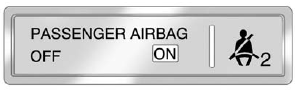
United States
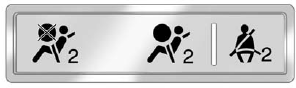
Canada and Mexico
When the vehicle is started, the passenger airbag status indicator will light ON and OFF, or the symbol for on and off, for several seconds as a system check. If you use remote start, if equipped, to start the vehicle, you may not see the system check. Then, after several more seconds, the status indicator will light either ON or OFF, or either the on or off symbol to let you know the status of the front outboard passenger frontal airbag.
If the word ON or the on symbol is lit on the passenger airbag status indicator, it means that the front outboard passenger frontal airbag is allowed to inflate.
If the word OFF or the off symbol is lit on the passenger airbag status indicator, it means that the passenger sensing system has turned off the front outboard passenger frontal airbag.
If, after several seconds, both status indicator lights remain on, or if there are no lights at all, there may be a problem with the lights or the passenger sensing system.
See your dealer for service.
WARNING
If the airbag readiness light ever comes on and stays on, it means that something may be wrong with the airbag system. To help avoid injury to yourself or others, have the vehicle serviced right away. See Airbag Readiness Light on page 5‑16 for more information, including important safety information.
See also:
FM
FM signals only reach about 16 to 65 km (10 to 40 mi). Although the radio has
a built-in electronic circuit that automatically works to reduce interference, some
static can occur, especially aroun ...
Storing and Deleting Phone Numbers
The system can store up to 30 phone numbers as name tags in the Hands&-Free Directory
that is shared between the Bluetooth and OnStar systems.
The following commands are used to delete and stor ...
When the System Does Not Seem To Work Properly
The rear vision camera system might not work properly or display a clear image if:
• The RVC is turned off.
See “Turning the Rear Camera System On or Off” earlier in this section.
• It is d ...