


Compass Variance (Zone) Procedure
1. Do not set the compass zone when the vehicle is moving.
Only set it when the vehicle is in P (Park).
Press the vehicle information button until PRESS  TO CHANGE COMPASS ZONE displays.
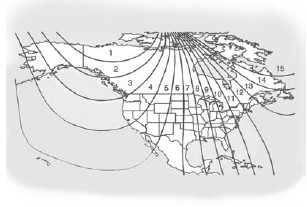
2. Find the vehicle's current location and variance zone number on the map.
Zones 1 through 15 are available.
3. Press the set/reset button to scroll through and select the appropriate variance zone.
4. Press the trip/fuel button until the vehicle heading, for example, N for North, is displayed in the DIC.
5. If calibration is necessary, calibrate the compass.
See “Compass Calibration Procedure” following.
See also:
Four-Wheel-Drive Vehicles
Use the following procedure to dolly tow a four-wheel-drive vehicle from the rear:
1. Attach the dolly to the tow vehicle following the dolly manufacturer's instructions.
2. Drive the rear wheels on ...
Satellite Radio
For vehicles equipped with the MyLink or IntelliLink infotainment system, see
the separate MyLink/ IntelliLink Features and Functions Guide for more information.
Vehicles with an XM™ Satellite Ra ...
Traction Control Operation
The traction control system is part of the StabiliTrak system. Traction control limits wheel spin by reducing engine power to the wheels (engine speed management) and by applying the brakes as necessa ...