


Cargo Management System
This vehicle has a cargo management system located in the rear.
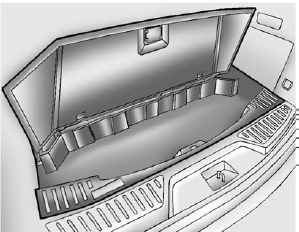
To remove the cargo management cover:
1. Open the cover. It remains open when lifted.
2. Pull the cover up making sure to unhook the hinges at the rear of the cover.
WARNING
An improperly latched and closed cargo cover, or cargo cover left in the open position, could be thrown about the vehicle during a crash or sudden maneuver.
Someone could be injured.
Be sure to return the cover to the closed position and latch before driving. If the cover is removed, always store it outside of the vehicle. When it is replaced, always be sure that it is securely reattached.
3. Remove the cover from the vehicle and store outside of the vehicle.
See also:
Acadia in the Market
The three-row crossover segment is getting increasingly crowded these days,
as car shoppers shift from minivans and truck-based SUVs to car-based vehicles
like the Acadia. It has a number of compe ...
Tachometer
The tachometer displays the engine speed in revolutions per minute (rpm). ...
Storing XM Channels
Drivers are encouraged to store XM channels while the vehicle is parked; see Defensive Driving on page 9‑3. Tune to stored radio stations using the presets, favorites button, and steering wheel ...