


Lumbar Adjustment
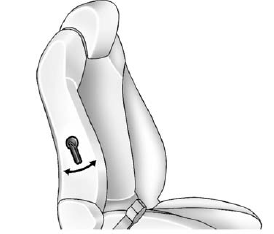
Manual Lumbar
If available, move the handle forward or rearward to increase or decrease lumbar support.
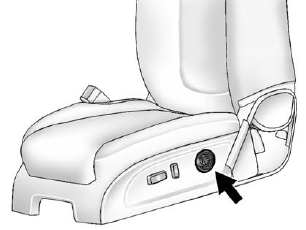
Power Lumbar
If available, press and hold the front or rear of control to increase or decrease lumbar support. Release the control when the seatback reaches the desired level of lumbar support.
See also:
Finding a Channel
BAND: Press to switch between AM, FM, or XM™, if equipped.
(Tune): Turn to manually select an XM channel.
SEEK: Press to go to the previous XM channel.
SEEK: Press to go to the next XM channel ...
Jump Starting
For more information about the vehicle battery, see Battery on page 10‑25.
If the vehicle's battery has run down, you may want to use another vehicle and some jumper cables to start your vehicl ...
Steering Wheel Adjustment
To adjust the steering wheel:
1. Pull the lever (A) down.
2. Move the steering wheel up or down.
3. Pull or push the steering wheel closer or away from you.
4. Pull the lever (A) up to lock the ...